Wedding RSVPs, beautifully simple
A simple way to collect RSVPs
for your wedding.
Create a wedding RSVP website that feels like part of your wedding, not another thing to manage. Add your invitation, ask exactly what you need, share and watch every response arrive live.
Quick to set up · No app for guests · Start free
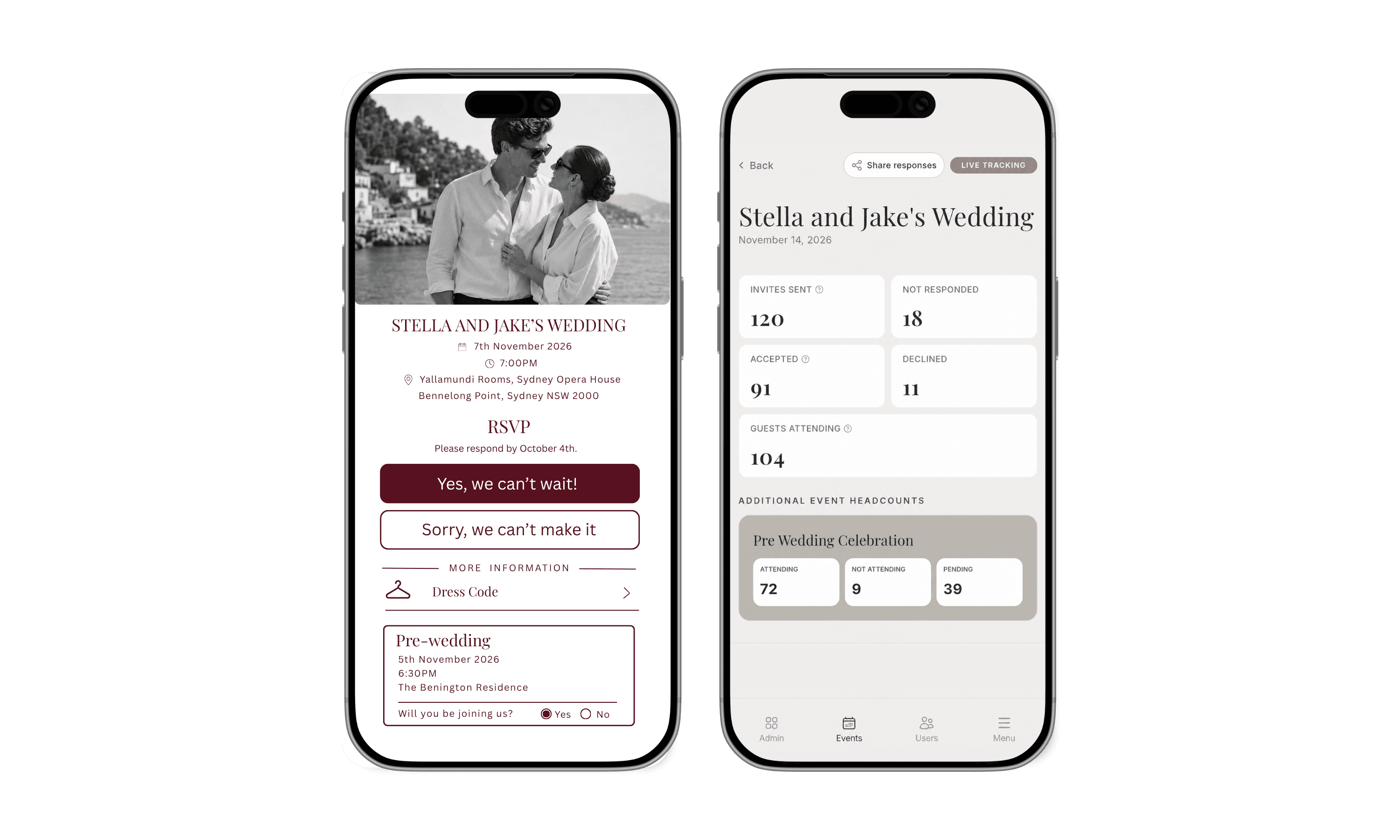
Share
SMS, email, link or QR code
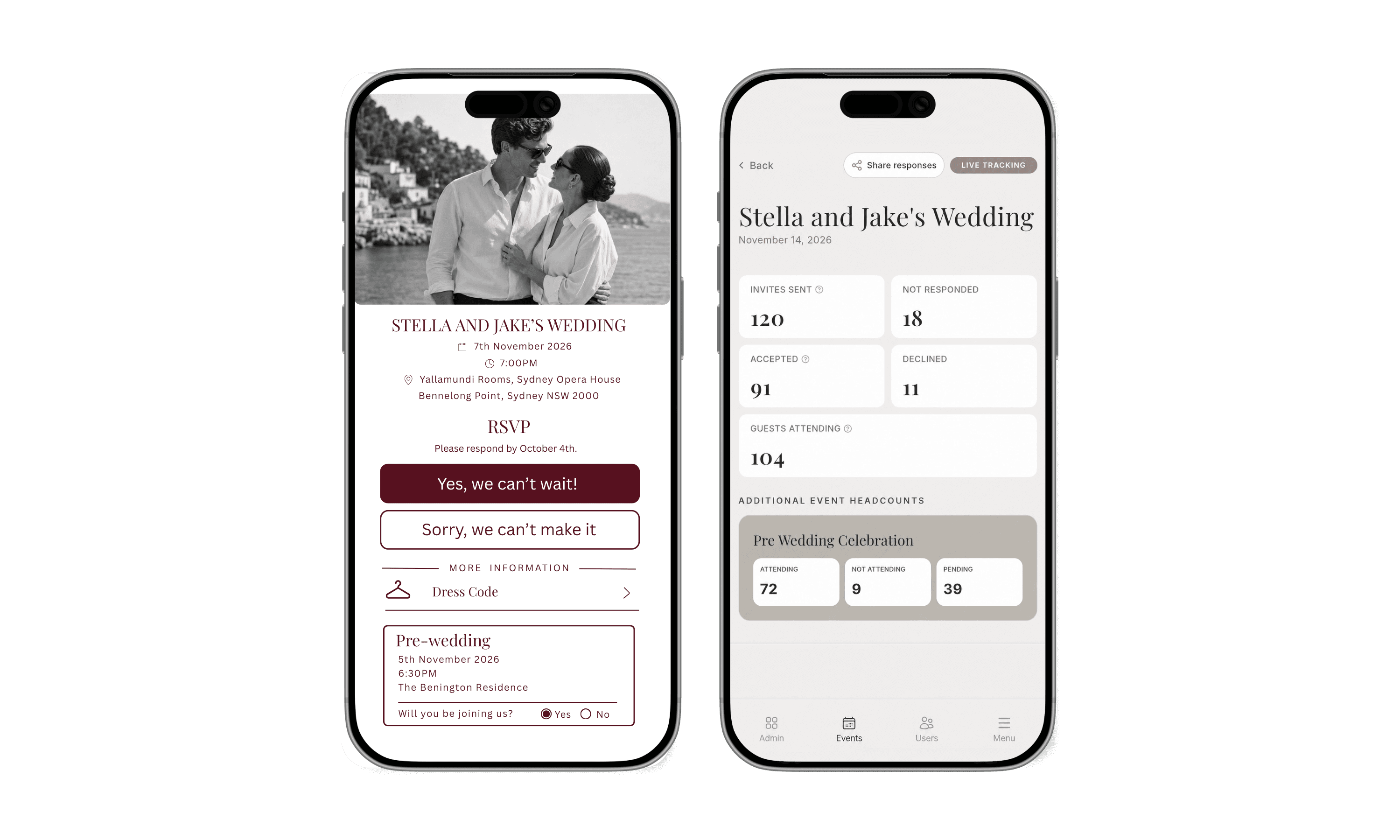
Live responses
organised as they arrive
Your questions
for one guest or everyone
Easy export
ready for your vendors
Less website. More wedding.
You don’t need a
whole website to give guests a beautiful way to RSVP.
You need one polished, thoughtful experience that looks like you, asks the right questions and keeps everything beautifully organised.
Use your invitation, or keep it minimal
Upload your digital design, feature your names or create a refined initials-led page.
Collect more than ‘yes’ or ‘no’
Capture meals, dietary needs, travel plans, song requests and anything else your day needs.
Keep every answer in one place
Wedding guest list management with no spreadsheets to merge, messages to chase or replies hiding across different apps.
Spend on the celebration, not a website
Give guests the part they need without paying for pages they’ll never use.
From invitation to organised guest list
Collect and manage your wedding RSVPs online in four simple steps.
Designed to feel elegant for guests and effortless behind the scenes.
Share your event
Share your online RSVP by
SMS, email, link or QR code
Send digital wedding invitations with RSVP in the way that suits you and give guests a quick, simple way to RSVP from any device.

Made for the details that matter
Build one smooth guest journey while RSVPeasy quietly organises the information your venue, caterer and planner will ask for.
Custom RSVP Questions
Collect dietary requirements, song requests, transport needs and other details.
Custom Information Links
Add accommodation, transport, parking, dress code, registry and itinerary links.
A design that feels like your wedding
Continue the look of your invitation or create something understated with your names, initials, colours and chosen type style.
Live dashboard and clean exports
Track attendance and every custom answer in real time with a live wedding RSVP tracker. Export the data when it's time to brief suppliers or finalise seating.
Automated RSVP Reminders
Automatically remind guests who haven’t responded before your RSVP deadline.
Plus-Ones & Family Groups
Allow guests to RSVP for their partner, children or invited family members.
One click for guests
Beautiful on the front. Brilliantly organised
behind it.
Your guests see a calm, polished RSVP that works on any device. You see the complete picture of your wedding as responses arrive.
On your stationery
A discreet QR code
Place it on your invitation or RSVP card without compromising your beautiful print design.
On their phone
A seamless guest experience
Guests scan, confirm their party and answer only the questions relevant to them. No account. No app.
In your dashboard
An answer you can actually use
Attendance, plus-ones, meals, dietary requirements and custom responses appear live and stay organised.
When vendors ask
A clean export, ready to share
Download everything instead of rebuilding your guest list from scattered messages and spreadsheets.
Made for modern weddings
Full creative control of your online wedding invitations with RSVP, with no design or technical experience needed.
Questions, answered
Before you create your
wedding RSVP.
Do we need a wedding website?
No. RSVPeasy works as a simple wedding RSVP website that gives your guests a dedicated, beautifully designed RSVP experience without the time and expense of creating a full wedding website.
Can we use our own invitation design?
Yes. Upload your digital invitation to continue its look online, or create a clean page using your names or initials if you prefer something more minimal.
Can different guests see different questions?
Yes. You can assign a question to the main guest only or ask it of every guest in the party—ideal for accommodation, transport, meal choices and dietary requirements.
How do guests access the RSVP?
Download your event QR code and add it to printed stationery, or share the RSVP link by message or email. Guests complete your wedding RSVP online in their browser without downloading an app.
Can we export our responses?
Yes. Responses appear live in your organised dashboard and can be exported when you need to share details with your planner, venue, caterer or other suppliers.
Your invitations deserve a beautiful next step
Turn one little QR code into your complete RSVP experience.
Set up quickly, customise every detail and give guests an effortless way to say ‘we’ll be there.’